Connect via HTTPS
Configure your agentgateway proxy to connect to an MCP server by using the HTTPS protocol.
About this guide
In this guide, you configure your agentgateway proxy to connect to the remote GitHub MCP server by using the HTTPS protocol. The server allows you to interact with GitHub repositories, issues, pull requests, and more. All connections to the server must be secured via HTTPS and a GitHub access token must be provided for authentication.
Before you begin
The example HTTPRoute in the following steps uses a CORS policy, which requires the experimental channel of the Kubernetes Gateway API.
-
Important: Install the experimental channel of the Kubernetes Gateway API to use this feature.
kubectl apply -f https://github.com/kubernetes-sigs/gateway-api/releases/download/v1.3.0/experimental-install.yaml -
Upgrade or install agentgateway with the
KGW_ENABLE_GATEWAY_API_EXPERIMENTAL_FEATURESenvironment variable. This setting defaults tofalseand must be explicitly enabled to use Gateway API experimental features, such as CORS.Example command:
helm upgrade -i agentgateway oci://ghcr.io/kgateway-dev/charts/agentgateway \ --namespace agentgateway-system \ --version v2.3.0-main \ --set controller.image.pullPolicy=Always \ --set controller.extraEnv.KGW_ENABLE_GATEWAY_API_EXPERIMENTAL_FEATURES=true -
Follow the Sample app guide to create a gateway proxy with an HTTP listener and deploy the httpbin sample app.
-
Get the external address of the gateway and save it in an environment variable.
export INGRESS_GW_ADDRESS=$(kubectl get svc -n agentgateway-system http -o jsonpath="{.status.loadBalancer.ingress[0]['hostname','ip']}")
echo $INGRESS_GW_ADDRESS
kubectl port-forward deployment/http -n agentgateway-system 8080:8080
Connect to the MCP server
-
Create a personal access token in GitHub and save it in an environment variable. For more information, see the GitHub docs.
export GH_PAT=<personal-access-token> -
Create the agentgateway-system for the remote GitHub MCP server. The server requires you to connect to it by using the HTTPS protocol. Because of that, you set the
mcp.targets.static.portfield to 443.kubectl apply -f- <<EOF apiVersion: agentgateway.dev/v1alpha1 kind: AgentgatewayBackend metadata: name: github-mcp-backend namespace: agentgateway-system spec: mcp: targets: - name: mcp-target static: host: api.githubcopilot.com port: 443 path: /mcp/ policies: tls: sni: api.githubcopilot.com EOF -
Create an HTTPRoute that routes traffic to the GitHub MCP server along the
/mcp-githubpath. To properly connect to the MCP server, you must allow traffic fromhttp://localhost:8080, which is the domain and port you expose your agentgateway proxy on later. If you expose the proxy under a different domain, make sure to add this domain to the allowed origins. Because the MCP server also requires a GitHub access token to connect, you set theAuthorizationheader to the token that you created earlier.kubectl apply -f- <<EOF apiVersion: gateway.networking.k8s.io/v1 kind: HTTPRoute metadata: name: mcp-github namespace: agentgateway-system spec: parentRefs: - name: agentgateway-proxy namespace: agentgateway-system rules: - matches: - path: type: PathPrefix value: /mcp-github filters: - type: CORS cors: allowHeaders: - "*" allowMethods: - "*" allowOrigins: - "http://localhost:8080" - type: RequestHeaderModifier requestHeaderModifier: set: - name: Authorization value: "Bearer ${GH_PAT}" backendRefs: - name: github-mcp-backend group: agentgateway.dev kind: AgentgatewayBackend EOF
Verify the connection
Use the MCP Inspector tool to verify that you can connect to your sample MCP server through agentgateway.
-
Get the agentgateway address.
export INGRESS_GW_ADDRESS=$(kubectl get gateway agentgateway-proxy -n agentgateway-system -o=jsonpath="{.status.addresses[0].value}")
echo $INGRESS_GW_ADDRESS
kubectl port-forward deployment/agentgateway-proxy 8080:80 -n agentgateway-system -
From your terminal, run the MCP Inspector command to open the MCP Inspector in your browser. If the MCP inspector tool does not open automatically, run
mcp-inspector.npx modelcontextprotocol/inspector#0.18.0 -
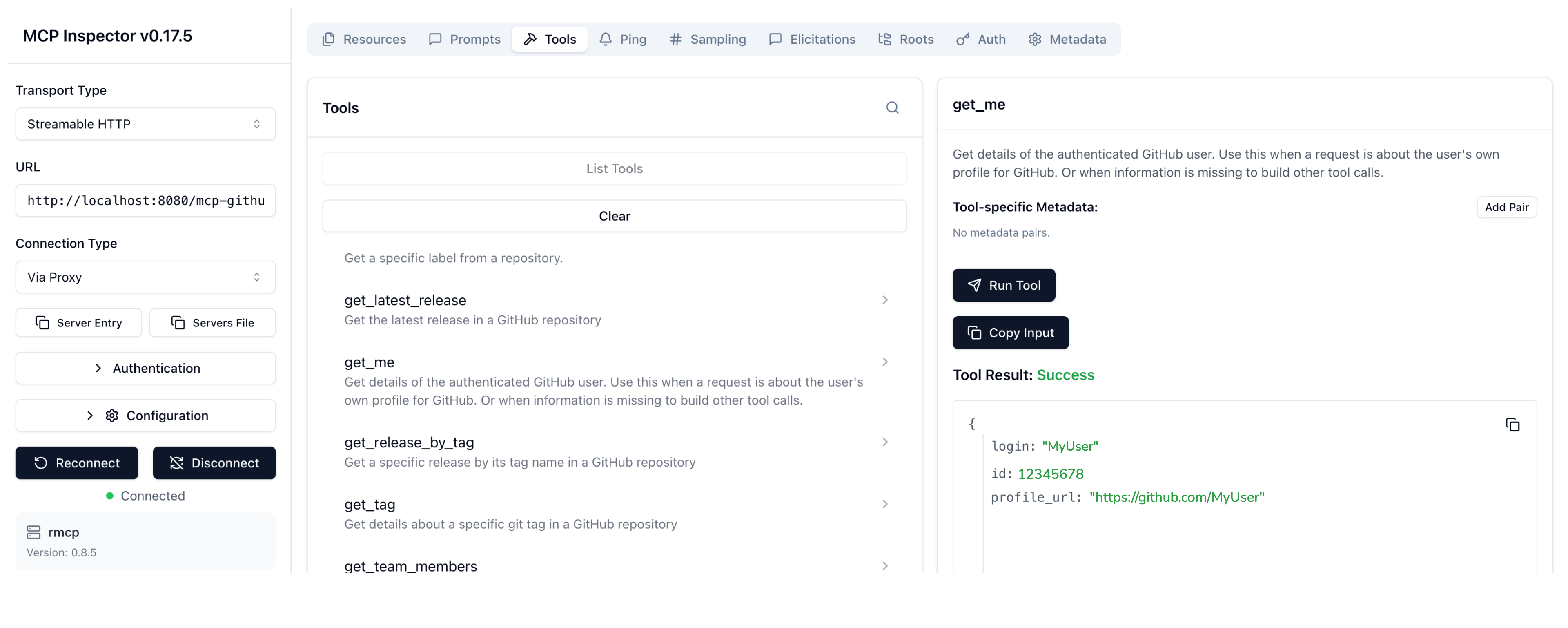
From the MCP Inspector menu, connect to your agentgateway address as follows:
- Transport Type: Select
Streamable HTTP. - URL: Enter the agentgateway address, port, and the
/mcp-githubpath. If your agentgateway proxy is exposed with a LoadBalancer server, usehttp://<lb-address>/mcp-github. In local test setups where you port-forwarded the agentgateway proxy on your local machine, usehttp://localhost:8080/mcp-github. - Click Connect.
- Transport Type: Select
-
From the menu bar, click the Tools tab. Then from the Tools pane, click List Tools and select the
get_metool. -
Click Run Tool.
-
Verify that you get back information about your username.
Cleanup
You can remove the resources that you created in this guide.kubectl delete AgentgatewayBackend github-mcp-backend -n agentgateway-system
kubectl delete HTTPRoute mcp-github -n agentgateway-system